

International Parcel Tracking Delay: When Should You Start Worrying?
Inhaltsverzeichnis
Internationale Paketverfolgung Delay is common with cross-border shipping. The real question is simple: is this a normal slow phase, or a real risk like a missed scan, a customs hold, or a handoff problem? Use this guide to read the signals, judge the timeline, and take the right action fast.
1. What an “International Parcel Tracking Delay” really means
Eine Internationale Paketverfolgung Delay is not one single problem. It’s a label for “no update” or “slower than expected” during a trip that often involves multiple hubs, different carriers, and handoffs that don’t always create a scan. Sometimes the parcel is moving, but the tracking page stays quiet.
Most delays fall into one of these buckets:
- Scanning gap: the parcel moves, but no scan shows up yet.
- Queue delay: export flights, customs, or local sorting gets backed up.
- Ausnahme: address issues, duties, return-to-sender, or a misroute.
1.1 Delay vs stuck: the quick difference
- Delay: tracking still matches the route, just slower.
- Stuck: no new scan for too long at a stage where scans are normally frequent.
2. Normal timelines (and when to worry)
These ranges help you stop guessing. Count Arbeitstage when possible.
2.1 Label created, but no “accepted” scan
- Normal: 1–4 days
- Worry: 5–7+ days
What it often means: the seller printed a label but has not handed it over, or the drop-off point scans slowly.
Was ist zu tun?
- Ask the sender for drop-off proof or pickup confirmation.
- If nothing changes after 7 days, request a reship/refund path.
2.2 Export processing (origin country)
- Normal: 2–7 days
- Worry: 10–14+ days
Common statuses:
- “Accepted at origin facility”
- “Processed at export hub”
- “Handed over to airline”
Was ist zu tun?
- Check for any “departed” or “linehaul” update.
- If it hits 14 days, contact the origin carrier or seller.

2.3 Transit / flight stage
- Normal: 3–10 days
- Worry: 12–20+ days with no arrival scan
What it often means: indirect routing, flight capacity limits, weather, or batch scan uploads.
Was ist zu tun?
- If there is no “arrived at destination country” after ~20 days, escalate.
2.4 Customs (destination country)
- Normal: 1–5 business days
- Worry: 7–10 business days, or repeated “clearance” loops
Was ist zu tun?
- Double-check recipient name, phone, and address details.
- Watch for duties/tax requests or document requests (invoice/order proof).
- If it stays in customs beyond 10 business days, open a case.
2.5 After customs, no local movement
- Normal: 1–4 days
- Worry: 5–8+ days after “released from customs”
Was ist zu tun?
- Track on the local post/courier website (sometimes it shows extra scans).
- If nothing changes after a week, contact the last-mile Träger.
3. Status messages that matter most
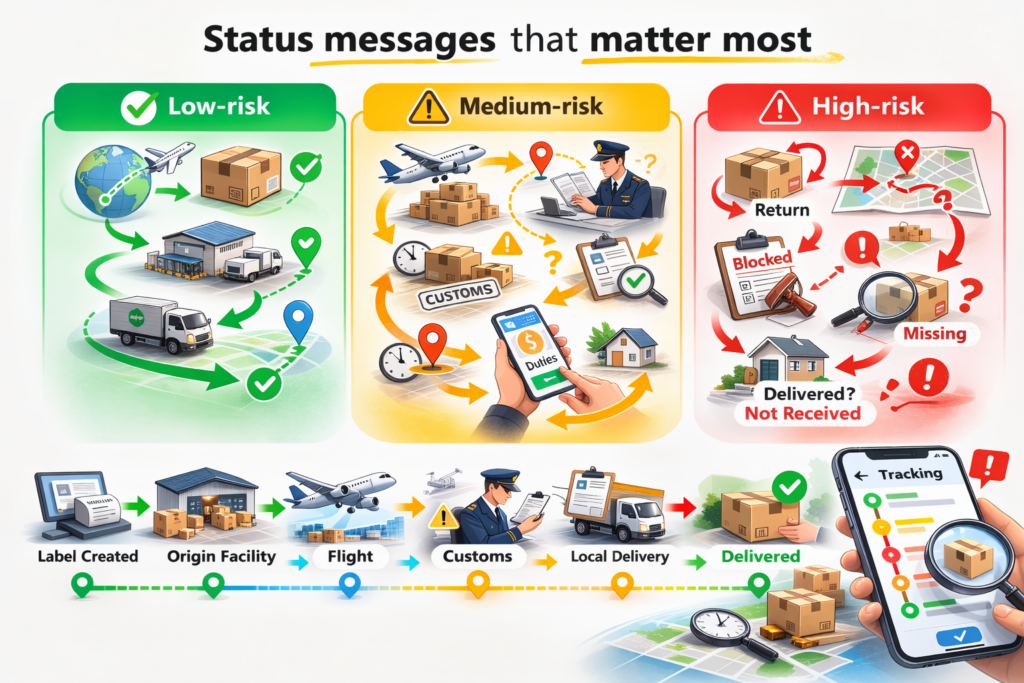
3.1 Low-risk (usually normal)
- “Unterwegs”
- “Departed facility”
- “Arrived at hub”
- “In der Anlage verarbeitet”
Focus on time since the last scan, not the wording alone.
3.2 Medium-risk (watch closely)
- “Exception” (read details)
- “Insufficient address”
- “Warten auf Zahlung von Zöllen/Steuern”
- "Lieferung attempt”
Action: fix the issue fast (address correction, payment, redelivery request).
3.3 High-risk (act now)
- “Return to sender initiated”
- “Undeliverable”
- “Missing / investigation”
- “Delivered” but not received
These are the moments to escalate immediately.
4. A simple 3-question decision checklist

Wenn Verfolgung looks frozen, ask:
4.1 Where is the last scan?
- Before acceptance scan → sender-side risk
- Export hub → flight/capacity queue
- Customs → paperwork/inspection
- After customs → last-mile handoff gap
4.2 How long since the last scan?
Practical triggers:
- 5-7 Arbeitstage: monitor closely
- 10 business days: contact support
- 15+ business days: open an investigation path
4.3 Does the status match that time?
Beispiel:
- “Departed origin” for 2–3 days is normal.
- “Departed origin” for 18 days is a red flag.
5. What to do when you decide it’s not normal
Keep the response plan short and disciplined.

5.1 Verify on multiple tracking systems
Prüfen:
- Origin carrier site
- Local carrier site (destination country)
- A multi-carrier tracker like Postpaket
Different systems can show different scans.
5.2 Gather proof in minutes
Vorbereiten:
- Invoice/order screenshot
- Full recipient address + phone
- Tracking history screenshot
- Seller ship date and service type
5.3 Contact the right party (based on stage)
- No acceptance scan → seller/origin pickup
- Export delay → origin carrier
- Customs delay → carrier + recipient (docs/tax)
- Last-mile delay → local courier/post
5.4 If tracking says “Delivered” but you didn’t receive it
Treat this as urgent:
- Check mailbox/locker/front desk/neighbors
- Request delivery photo or GPS proof (if available)
- Open a case within 24-48 Stunden
- Notify the seller if required
6. Quick prevention tips that reduce delays

6.1 Fix address formatting
- Include unit/apartment number clearly
- Match postal code with city
- Add a reachable phone number
6.2 Know “delay-prone” categories
Delays happen more with:
- Batteries (especially lithium)
- Liquids/aerosols/perfume
- Food/supplements
- Restricted branded items on certain lanes
6.3 Use tracking-friendly services for urgent items
Prefer services with:
- lückenlose Verfolgung
- frequent scans
- clear last-mile handoff visibility
7. Schlussfolgerung
International Parcel Tracking Delay becomes a real worry when the parcel stays too long in one stage, or when tracking shows exceptions like return, undeliverable, or delivered-but-missing. Anchor your decision on the last scan location and business-day thresholds. Then verify tracking across carriers, gather your proof, and contact the party that controls the current stage. Postalparcel makes this easier by showing the full route and the last meaningful scan in one place.

Einblicke in die Industrie

Nachrichten über den Posteingang
Nulla turp dis cursus. Integer liberos euismod pretium faucibua